

OpenAI Responses API Application and Usage
Compatible model requests accepted by the platform are billed based on the model's input, output, and cache usage. The total Responses input includes the reported cached tokens, and the cached portion is charged at the corresponding cache price; switching interface formats will not change this to fixed-per-request billing. Fees are subject to the current model prices in the console and response usage.cost.
OpenAI has recently introduced an API for creating model responses. Provide text or image input to generate text or image output. Let the model call your own custom code or use built-in tools, such as web search or file search, to use your own data as input for model responses.
This document mainly introduces the usage process of the OpenAI Responses API. With it, we can easily use the official OpenAI model response creation feature.
¶ GPT-6.1 Terra
Use model: "gpt-6.1-terra" to select this model. It supports text and image input, streaming output, function tools, and structured output. Reasoning levels support low, medium, high, xhigh, and max; it is recommended to start with reasoning: {"effort": "low"}; none or minimal are not supported. Long-context pricing applies when input exceeds 272,000 tokens, and actual fees are subject to the current console prices and the usage in the response.
¶ GPT-6.1 Sol
Use model: "gpt-6.1-sol" to select this model. It supports streaming output, function calling, structured output, and image input. During the first week of availability, it is only available to verified ACE T1+ holders (at least 100,000 ACE) or authorized users; the specific availability time is subject to the access prompt in the console.
Reasoning levels support low, medium, high, xhigh, and max; none or minimal are not supported for the time being. It is recommended to start with reasoning: {"effort": "low"}. When input exceeds 272,000 tokens, long-context pricing applies to the entire request, and fees are subject to the current console prices.
¶ Application Process
To use the OpenAI Responses API, first go to the 灵蛇AI Console to obtain your API Token as a backup.

If you have not logged in or registered yet, you will be automatically redirected to the login page to register and log in, and you will automatically return to the current page after completion.
One API Token can call all platform services, without needing to apply separately for each service. Your first application will receive free credits for a free trial; when credits are insufficient, you can top up your general balance in the console.
📘 Full documentation: OpenAI Responses API →
¶ Basic Usage
Next, you can fill in the corresponding content in the interface, as shown in the figure:
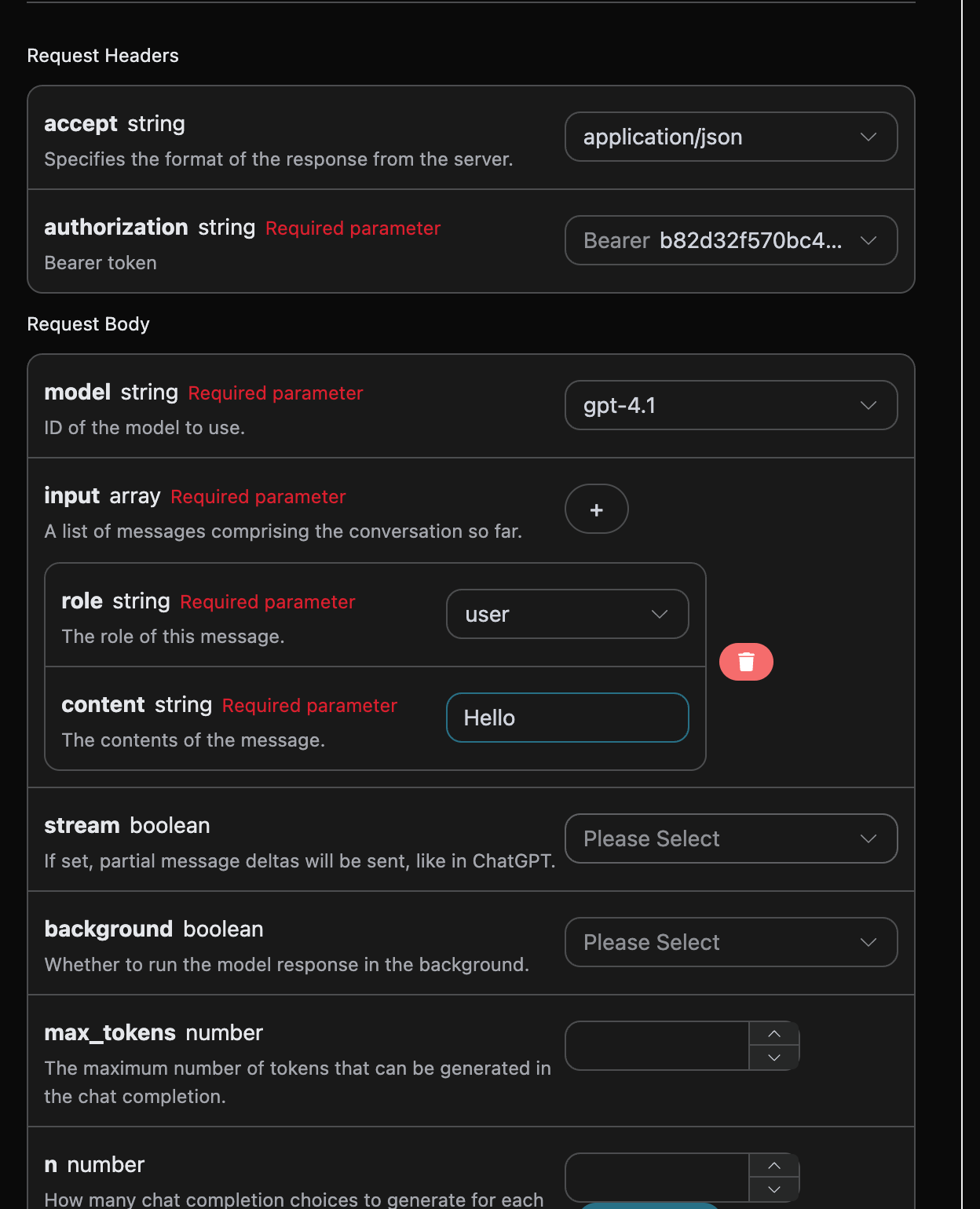
When using this API for the first time, we need to fill in at least three items. One is authorization, which can be directly selected from the dropdown list. Another parameter is model; model is the OpenAI ChatGPT official website model category we choose to use. Here, we mainly have 20 models, and you can view the models we provide for details. The last parameter is input; input is the array of prompt words we enter. It is an array, indicating that multiple prompt words can be uploaded at the same time. Each prompt word contains role and content, where role indicates the role of the questioner. We provide three identities: user, assistant, and system. The other content is the specific content of our question.
At the same time, you can notice that there is corresponding call code generated on the right. You can copy the code and run it directly, or directly click the “Try” button for testing.
Common optional parameters:
max_tokens: Limits the maximum number of tokens in a single reply.temperature: Generation randomness, between 0 and 2; the larger the value, the more divergent it is.n: How many candidate replies to generate at once.response_format: Return format settings.tools: Function/tool call definitions.background: Whether to run asynchronously in the background.
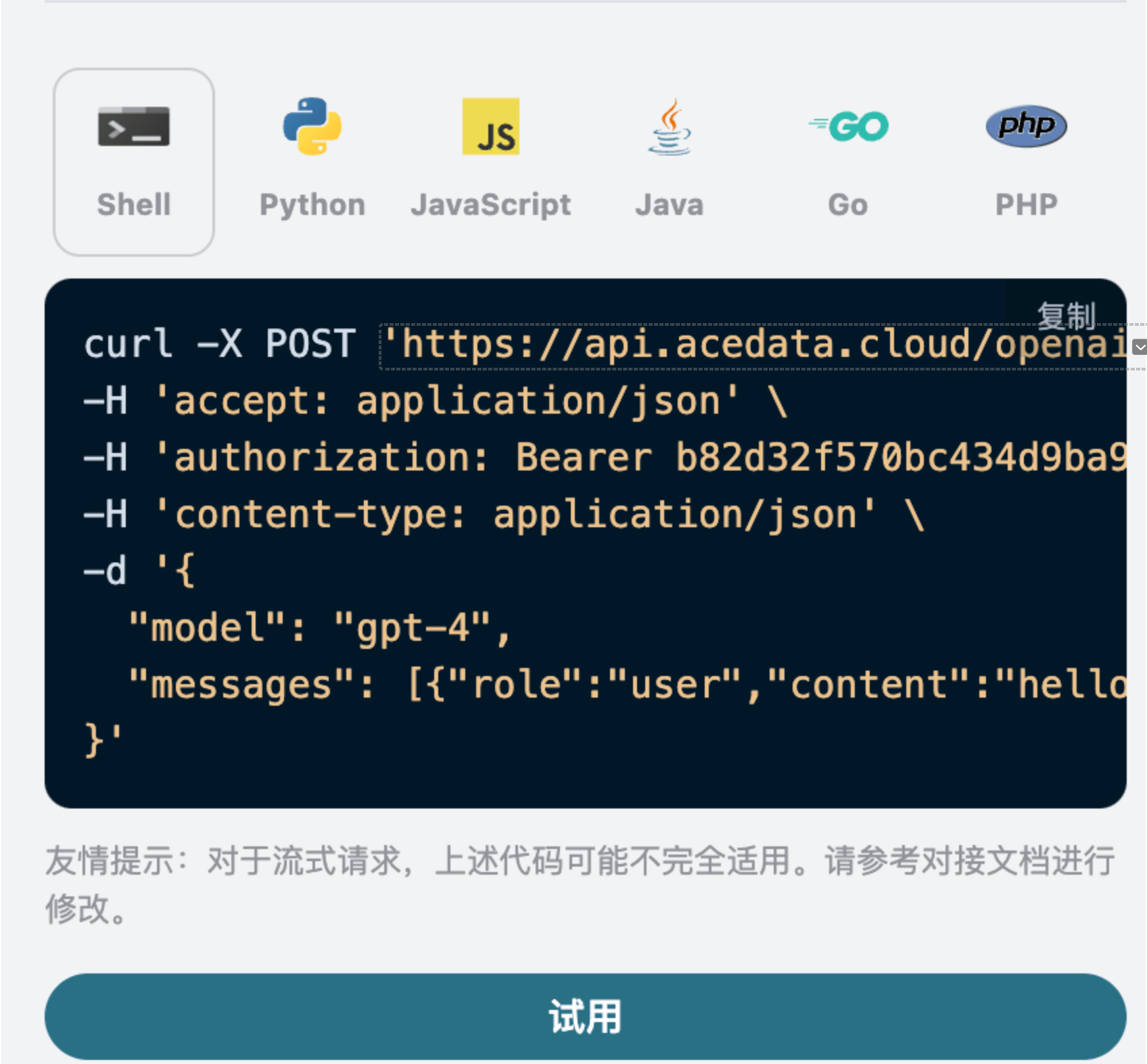
After calling, we find that the returned result is as follows:
{
  "id": "resp_68a98322e3c88191a027de2711a02a490554cad0b36c0400",
  "object": "response",
  "created_at": 1755939618,
  "status": "completed",
  "background": false,
  "content_filters": null,
  "error": null,
  "incomplete_details": null,
  "instructions": null,
  "max_output_tokens": null,
  "max_tool_calls": null,
  "model": "gpt-5.5",
  "output": [
    {
      "id": "msg_68a98323422c8191a7f383eea48ba5160554cad0b36c0400",
      "type": "message",
      "status": "completed",
      "content": [
        {
          "type": "output_text",
          "annotations": [],
          "text": "Hello! How can I assist you today?"
        }
      ],
      "role": "assistant"
    }
  ],
  "parallel_tool_calls": true,
  "previous_response_id": null,
  "prompt_cache_key": null,
  "reasoning": {
    "effort": null,
    "summary": null
  },
  "safety_identifier": null,
  "service_tier": "default",
  "store": true,
  "temperature": 1,
  "text": {
    "format": {
      "type": "text"
    }
  },
  "tool_choice": "auto",
  "tools": [],
  "top_p": 1,
  "truncation": "disabled",
  "usage": {
    "input_tokens": 8,
    "input_tokens_details": {
      "cached_tokens": 0
    },
    "output_tokens": 10,
    "output_tokens_details": {
      "reasoning_tokens": 0
    },
    "total_tokens": 18
  },
  "user": null,
  "metadata": {}
}
The returned result contains multiple fields, introduced as follows:
id, the ID generated for this conversation task, used to uniquely identify this conversation task.model, the selected OpenAI ChatGPT official website model.output, the response information provided by ChatGPT for the prompt word.usage: Statistical information on tokens for this Q&A session.
Among them, output contains ChatGPT's response information, and the output inside it is ChatGPT, as shown in the figure.
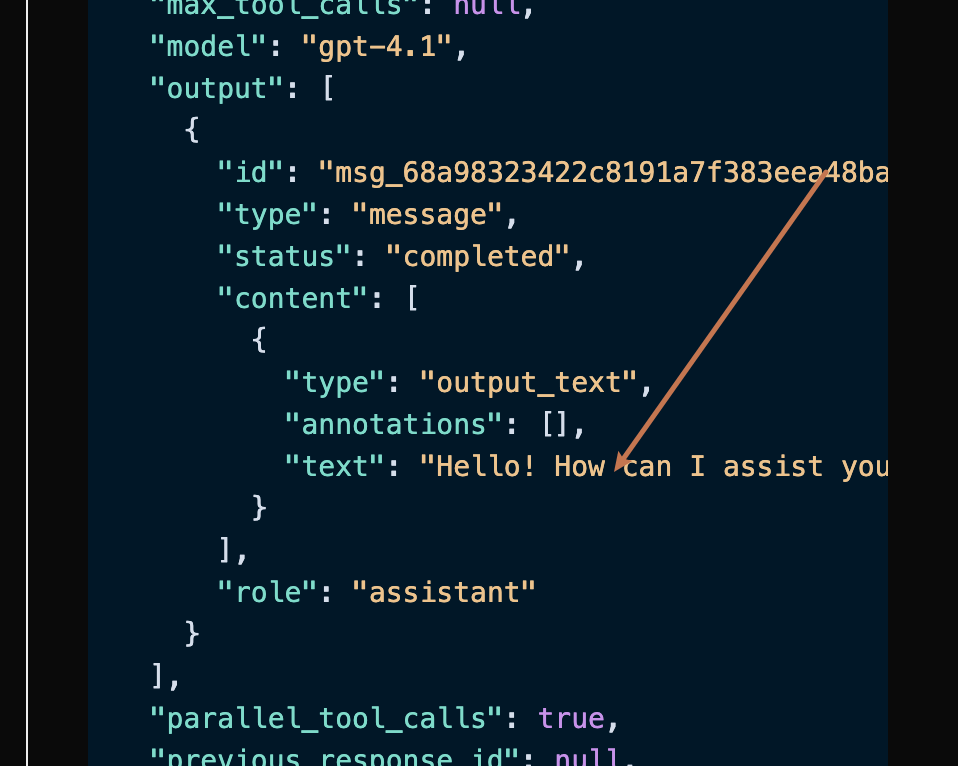
It can be seen that the content field in output contains the specific content of ChatGPT's reply.
¶ Streaming Response
This API also supports streaming responses, which is very useful for web integration and can enable a word-by-word display effect on web pages.
If you want to return responses in a stream, you can change the stream parameter in the request header to true.
The modification is shown in the figure, but the call code needs corresponding changes to support streaming responses.
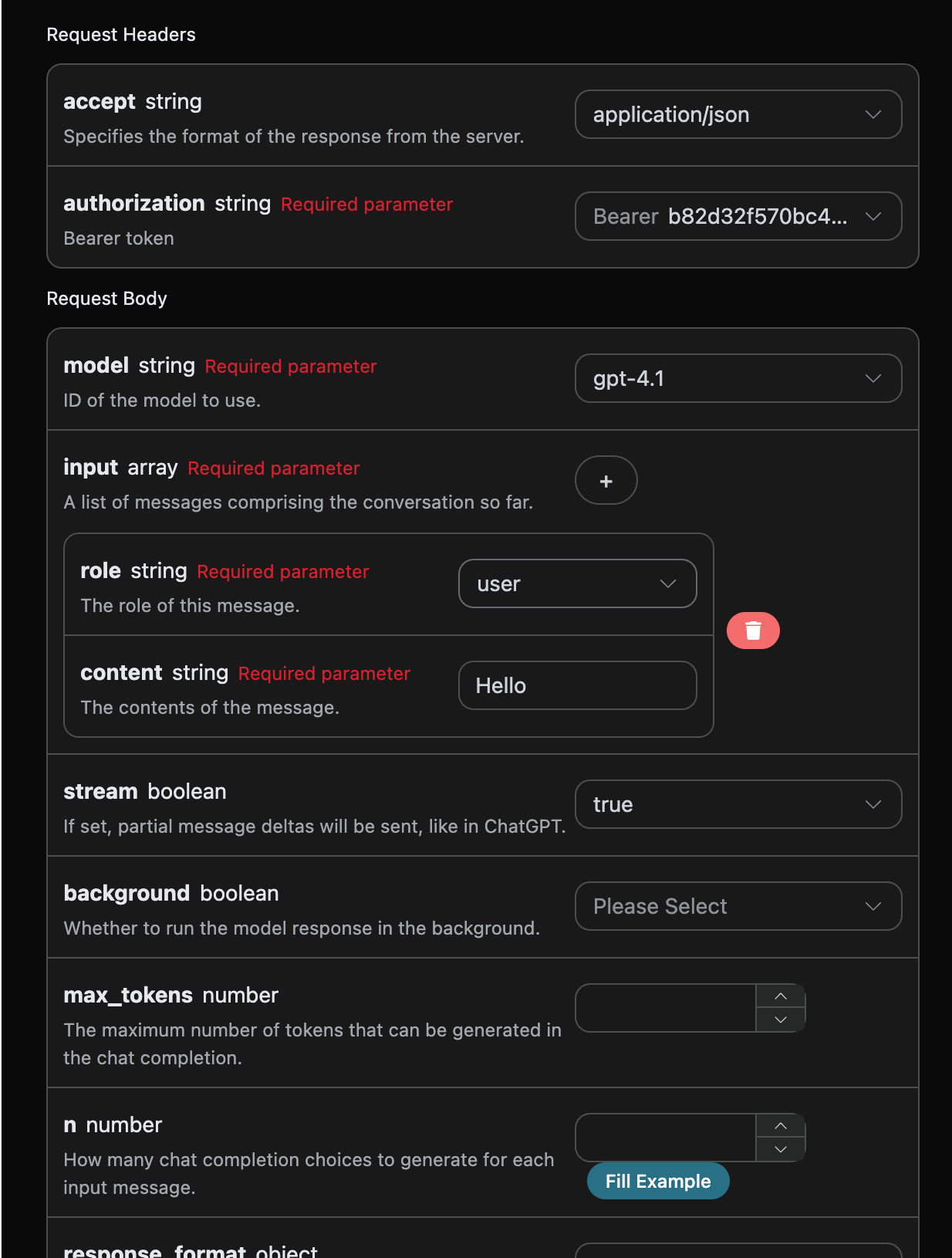
After modifying stream to true, the API will return the corresponding JSON data line by line. At the code level, we need to make corresponding modifications to obtain the line-by-line results.
Python sample invocation code:
import requests

url = "https://api.opensnake.cloud/openai/responses"

headers = {
    "accept": "application/json",
    "authorization": "Bearer {token}",
    "content-type": "application/json"
}

payload = {
    "model": "gpt-4.1",
    "input": [{"role":"user","content":"Hello"}],
    "stream": True
}

response = requests.post(url, json=payload, headers=headers)
print(response.text)
The output is as follows:
data: {"type": "response.created", "sequence_number": 0, "response": {"id": "resp_68a9837bb9bc8190b403947311db6faa0721186e8fbb89d0", "object": "response", "created_at": 1755939707, "status": "in_progress", "background": false, "content_filters": null, "error": null, "incomplete_details": null, "instructions": null, "max_output_tokens": null, "max_tool_calls": null, "model": "gpt-4.1-data", "output": [], "parallel_tool_calls": true, "previous_response_id": null, "prompt_cache_key": null, "reasoning": {"effort": null, "summary": null}, "safety_identifier": null, "service_tier": "auto", "store": true, "temperature": 1.0, "text": {"format": {"type": "text"}}, "tool_choice": "auto", "tools": [], "top_p": 1.0, "truncation": "disabled", "usage": null, "user": null, "metadata": {}}, "model": "gpt-4.1"}

data: {"type": "response.in_progress", "sequence_number": 1, "response": {"id": "resp_68a9837bb9bc8190b403947311db6faa0721186e8fbb89d0", "object": "response", "created_at": 1755939707, "status": "in_progress", "background": false, "content_filters": null, "error": null, "incomplete_details": null, "instructions": null, "max_output_tokens": null, "max_tool_calls": null, "model": "gpt-4.1-data", "output": [], "parallel_tool_calls": true, "previous_response_id": null, "prompt_cache_key": null, "reasoning": {"effort": null, "summary": null}, "safety_identifier": null, "service_tier": "auto", "store": true, "temperature": 1.0, "text": {"format": {"type": "text"}}, "tool_choice": "auto", "tools": [], "top_p": 1.0, "truncation": "disabled", "usage": null, "user": null, "metadata": {}}, "model": "gpt-4.1"}

data: {"type": "response.output_item.added", "sequence_number": 2, "output_index": 0, "item": {"id": "msg_68a9837c49f081908f568bf9c6065c620721186e8fbb89d0", "type": "message", "status": "in_progress", "content": [], "role": "assistant"}, "model": "gpt-4.1"}

data: {"type": "response.content_part.added", "sequence_number": 3, "item_id": "msg_68a9837c49f081908f568bf9c6065c620721186e8fbb89d0", "output_index": 0, "content_index": 0, "part": {"type": "output_text", "annotations": [], "text": ""}, "model": "gpt-4.1"}

data: {"type": "response.output_text.delta", "sequence_number": 4, "item_id": "msg_68a9837c49f081908f568bf9c6065c620721186e8fbb89d0", "output_index": 0, "content_index": 0, "delta": "Hello", "model": "gpt-4.1"}

data: {"type": "response.output_text.delta", "sequence_number": 5, "item_id": "msg_68a9837c49f081908f568bf9c6065c620721186e8fbb89d0", "output_index": 0, "content_index": 0, "delta": "!", "model": "gpt-4.1"}

data: {"type": "response.output_text.delta", "sequence_number": 6, "item_id": "msg_68a9837c49f081908f568bf9c6065c620721186e8fbb89d0", "output_index": 0, "content_index": 0, "delta": " How", "model": "gpt-4.1"}

data: {"type": "response.output_text.delta", "sequence_number": 7, "item_id": "msg_68a9837c49f081908f568bf9c6065c620721186e8fbb89d0", "output_index": 0, "content_index": 0, "delta": " can", "model": "gpt-4.1"}

data: {"type": "response.output_text.delta", "sequence_number": 8, "item_id": "msg_68a9837c49f081908f568bf9c6065c620721186e8fbb89d0", "output_index": 0, "content_index": 0, "delta": " I", "model": "gpt-4.1"}

data: {"type": "response.output_text.delta", "sequence_number": 9, "item_id": "msg_68a9837c49f081908f568bf9c6065c620721186e8fbb89d0", "output_index": 0, "content_index": 0, "delta": " help", "model": "gpt-4.1"}

data: {"type": "response.output_text.delta", "sequence_number": 10, "item_id": "msg_68a9837c49f081908f568bf9c6065c620721186e8fbb89d0", "output_index": 0, "content_index": 0, "delta": " you", "model": "gpt-4.1"}

data: {"type": "response.output_text.delta", "sequence_number": 11, "item_id": "msg_68a9837c49f081908f568bf9c6065c620721186e8fbb89d0", "output_index": 0, "content_index": 0, "delta": " today", "model": "gpt-4.1"}

data: {"type": "response.output_text.delta", "sequence_number": 12, "item_id": "msg_68a9837c49f081908f568bf9c6065c620721186e8fbb89d0", "output_index": 0, "content_index": 0, "delta": "?", "model": "gpt-4.1"}

data: {"type": "response.output_text.delta", "sequence_number": 13, "item_id": "msg_68a9837c49f081908f568bf9c6065c620721186e8fbb89d0", "output_index": 0, "content_index": 0, "delta": " 😊", "model": "gpt-4.1"}

data: {"type": "response.output_text.done", "sequence_number": 14, "item_id": "msg_68a9837c49f081908f568bf9c6065c620721186e8fbb89d0", "output_index": 0, "content_index": 0, "text": "Hello! How can I help you today? 😊", "model": "gpt-4.1"}

data:
{"type": "response.content_part.done", "sequence_number": 15, "item_id": "msg_68a9837c49f081908f568bf9c6065c620721186e8fbb89d0", "output_index": 0, "content_index": 0, "part": {"type": "output_text", "annotations": [], "text": "Hello! How can I help you today? 😊"}, "model": "gpt-4.1"}
data: {"type": "response.output_item.done", "sequence_number": 16, "output_index": 0, "item": {"id": "msg_68a9837c49f081908f568bf9c6065c620721186e8fbb89d0", "type": "message", "status": "completed", "content": [{"type": "output_text", "annotations": [], "text": "Hello! How can I help you today? 😊"}], "role": "assistant"}, "model": "gpt-4.1"}
data: {"type": "response.completed", "sequence_number": 17, "response": {"id": "resp_68a9837bb9bc8190b403947311db6faa0721186e8fbb89d0", "object": "response", "created_at": 1755939707, "status": "completed", "background": false, "content_filters": null, "error": null, "incomplete_details": null, "instructions": null, "max_output_tokens": null, "max_tool_calls": null, "model": "gpt-4.1-data", "output": [{"id": "msg_68a9837c49f081908f568bf9c6065c620721186e8fbb89d0", "type": "message", "status": "completed", "content": [{"type": "output_text", "annotations": [], "text": "Hello! How can I help you today? 😊"}], "role": "assistant"}], "parallel_tool_calls": true, "previous_response_id": null, "prompt_cache_key": null, "reasoning": {"effort": null, "summary": null}, "safety_identifier": null, "service_tier": "default", "store": true, "temperature": 1.0, "text": {"format": {"type": "text"}}, "tool_choice": "auto", "tools": [], "top_p": 1.0, "truncation": "disabled", "usage": {"input_tokens": 8, "input_tokens_details": {"cached_tokens": 0}, "output_tokens": 11, "output_tokens_details": {"reasoning_tokens": 0}, "total_tokens": 19}, "user": null, "metadata": {}}, "model": "gpt-4.1"}
It can be seen that there are many `data` entries in the response, and the `delta` in `data` is the latest response content, which is consistent with the content introduced above. `delta` is the newly added response content, and you can integrate it into your system based on the result. Streaming responses use `response.completed` or `response.incomplete` as terminal states; the `usage` in the terminal state is the final token usage for this request and is also the basis for billing.

If the client disconnects before the terminal state arrives, this request will be recorded as client closed (499), and local estimated tokens will not be used for billing; if the connection ends normally but the terminal state and final `usage` are not received, this request will be recorded as an incomplete response (502), and estimated tokens will likewise not be used for billing. When either of these situations occurs, please initiate the request again.

The returned `data` result contains multiple fields, which are introduced as follows:

- `item_id`, the ID generated for this conversation task, used to uniquely identify this conversation task.
- `type`, the type of the generated conversation Responses task.
- `model `, the selected model from the official OpenAI ChatGPT website.
- `delta`, the response information provided by ChatGPT for the prompt.

JavaScript is also supported. For example, the streaming invocation code for Node.js is as follows:

```javascript
const options = {
  method: "post",
  headers: {
    accept: "application/json",
    authorization: "Bearer b82d32f570bc434d9ba9923aa0e7dce0",
    "content-type": "application/json",
  },
  body: JSON.stringify({
    model: "gpt-4.1",
    input: [{ role: "user", content: "Hello" }],
    stream: true,
  }),
};

fetch("https://api.opensnake.cloud/openai/responses", options)
  .then((response) => response.json())
  .then((response) => console.log(response))
  .catch((err) => console.error(err));
Java sample code:
JSONObject jsonObject = new JSONObject();
jsonObject.put("model", "gpt-4.1");
jsonObject.put("input", [{"role":"user","content":"Hello"}]);
jsonObject.put("stream", true);
MediaType mediaType = "application/json; charset=utf-8".toMediaType();
RequestBody body = jsonObject.toString().toRequestBody(mediaType);
Request request = new Request.Builder()
  .url("https://api.opensnake.cloud/openai/responses")
  .post(body)
  .addHeader("accept", "application/json")
  .addHeader("authorization", "Bearer b82d32f570bc434d9ba9923aa0e7dce0")
  .addHeader("content-type", "application/json")
  .build();

OkHttpClient client = new OkHttpClient();
Response response = client.newCall(request).execute();
System.out.print(response.body!!.string())
Other languages can be adapted separately; the principle is the same.
¶ Multi-turn Conversations
If you want to integrate multi-turn conversation functionality, you need to upload multiple prompts to the input field. A specific example of multiple prompts is shown in the figure below:
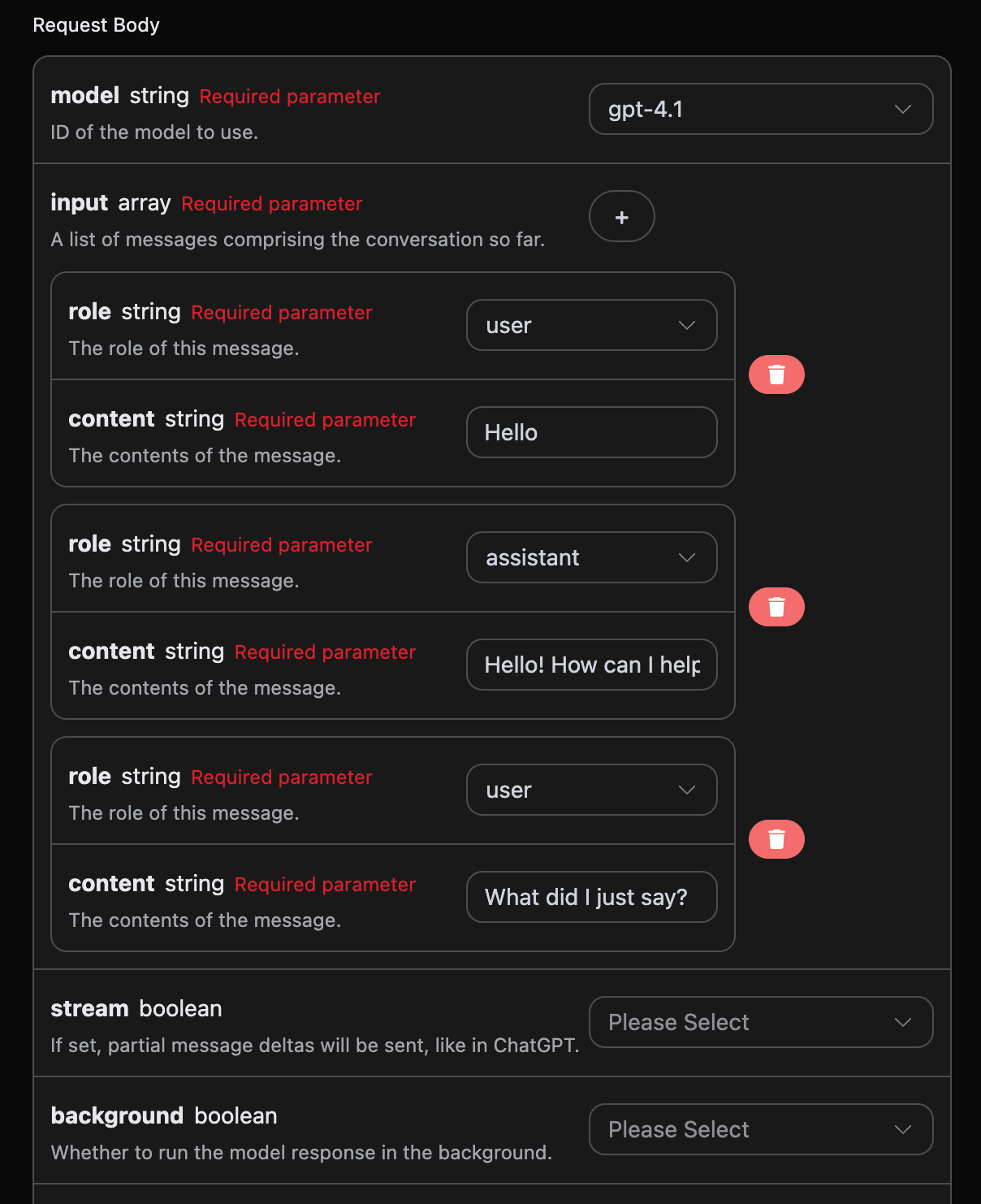
Python sample invocation code:
import requests

url = "https://api.opensnake.cloud/openai/responses"

headers = {
    "accept": "application/json",
    "authorization": "Bearer {token}",
    "content-type": "application/json"
}

payload = {
    "model": "gpt-4.1",
    "input": [{"role":"user","content":"Hello"},{"role":"assistant","content":"Hello! How can I help you today? 😊"},{"role":"user","content":"What did I just say?"}]
}

response = requests.post(url, json=payload, headers=headers)
print(response.text)
By uploading multiple prompts, you can easily implement multi-turn conversations and obtain the following response:
{
  "id": "resp_68a989c03c508191a1dd82ce2e37e88a0932a4328c0a5d5b",
  "object": "response",
  "created_at": 1755941312,
  "status": "completed",
  "background": false,
  "content_filters": null,
  "error": null,
  "incomplete_details": null,
  "instructions": null,
  "max_output_tokens": null,
  "max_tool_calls": null,
  "model": "gpt-4.1",
  "output": [
    {
      "id": "msg_68a989c092e4819189821a9eb8247e1e0932a4328c0a5d5b",
      "type": "message",
      "status": "completed",
      "content": [
        {
          "type": "output_text",
          "annotations": [],
          "text": "You just said \"Hello.\" \n\nWould you like to continue the conversation or ask a question?"
        }
      ],
      "role": "assistant"
    }
  ],
  "parallel_tool_calls": true,
  "previous_response_id": null,
  "prompt_cache_key": null,
  "reasoning": {
    "effort": null,
    "summary": null
  },
  "safety_identifier": null,
  "service_tier": "default",
  "store": true,
  "temperature": 1,
  "text": {
    "format": {
      "type": "text"
    }
  },
  "tool_choice": "auto",
  "tools": [],
  "top_p": 1,
  "truncation": "disabled",
  "usage": {
    "input_tokens": 32,
    "input_tokens_details": {
      "cached_tokens": 0
    },
    "output_tokens": 20,
    "output_tokens_details": {
      "reasoning_tokens": 0
    },
    "total_tokens": 52
  },
  "user": null,
  "metadata": {}
}
It can be seen that the information contained in output is consistent with the content of the basic usage. This contains the specific content of ChatGPT's replies across multiple conversations, so corresponding questions can be answered based on the content of multiple conversations.
¶ Vision Model
gpt-4o is a multimodal large language model developed by OpenAI. It adds visual understanding capabilities on the basis of GPT-4. This model can process both text and image inputs simultaneously, achieving cross-modal understanding and generation.
The text processing of the gpt-4o model is consistent with the basic usage content above. The following will briefly introduce how to use the image processing capabilities of the model.
The image processing capability of the gpt-4o model is mainly used by adding a type field based on the original content content. Through this field, it is possible to know whether the uploaded content is text or an image, thereby using the image processing capability of the gpt-4o model. The following mainly describes calling this feature in two ways: Curl and Python.
- Curl script method
curl -X POST 'https://api.opensnake.cloud/openai/responses' \
-H 'accept: application/json' \
-H 'authorization: Bearer {token}' \
-H 'content-type: application/json' \
-d '{
    "model": "gpt-4.1",
    "input": [
      {
        "role": "user",
        "content": [
          {"type": "input_text", "text": "what is in this image?"},
          {
            "type": "input_image",
            "image_url": "https://cdn.acedata.cloud/e724d7f13d.png"
          }
        ]
      }
    ]
  }'
- Python script method
import requests

url = "https://api.opensnake.cloud/openai/chat/completions"

headers = {
    "accept": "application/json",
    "authorization": "Bearer {token}",
    "content-type": "application/json"
}

payload = {
    "model": "gpt-4.1",
    "input": [
      {
        "role": "user",
        "content": [
          {"type": "input_text", "text": "what is in this image?"},
          {
            "type": "input_image",
            "image_url": "https://cdn.acedata.cloud/e724d7f13d.png"
          }
        ]
      }
    ]
  }

response = requests.post(url, json=payload, headers=headers)
print(response.text)
Then the following result can be obtained. The field information in the result is consistent with the above, specifically as follows:
{
  "id": "resp_68a98c1bb784819e9b9f622007a2d37602483949012d2193",
  "object": "response",
  "created_at": 1755941915,
  "status": "completed",
  "background": false,
  "content_filters": null,
  "error": null,
  "incomplete_details": null,
  "instructions": null,
  "max_output_tokens": null,
  "max_tool_calls": null,
  "model": "gpt-4.1",
  "output": [
    {
      "id": "msg_68a98c1dd030819e97fb71e6ee33f5a902483949012d2193",
      "type": "message",
      "status": "completed",
      "content": [
        {
          "type": "output_text",
          "annotations": [],
          "text": "This image shows a scenic path, possibly a boardwalk, running through a lush green field or meadow. The sky above is bright blue with some white clouds, and there are green trees and bushes in the background. It looks like a peaceful nature scene, possibly in a park, wetland, or prairie area. The image conveys a sense of tranquility and natural beauty."
        }
      ],
      "role": "assistant"
    }
  ],
  "parallel_tool_calls": true,
  "previous_response_id": null,
  "prompt_cache_key": null,
  "reasoning": {
    "effort": null,
    "summary": null
  },
  "safety_identifier": null,
  "service_tier": "default",
  "store": true,
  "temperature": 1,
  "text": {
    "format": {
      "type": "text"
    }
  },
  "tool_choice": "auto",
  "tools": [],
  "top_p": 1,
  "truncation": "disabled",
  "usage": {
    "input_tokens": 1118,
    "input_tokens_details": {
      "cached_tokens": 0
    },
    "output_tokens": 75,
    "output_tokens_details": {
      "reasoning_tokens": 0
    },
    "total_tokens": 1193
  },
  "user": null,
  "metadata": {}
}
It can be seen that the answer content is based on the image. Therefore, through the above two methods, the text and image processing capabilities of the gpt-4.1 model can be easily used.
In addition to gpt-4.1, there is also a lower-cost model called gpt-4o-mini. gpt-4o-mini is the latest-generation large language model developed by OpenAI. It not only responds quickly, but is also cheaper and supports multimodality. For the usage of the vision feature, refer to the usage content of the gpt-4.1 model above.
¶ Creation of File Processing Models
Request example:
{
  "model": "gpt-4.1",
  "input": [
    {
      "role": "user",
      "content": [
        { "type": "input_text", "text": "what is in this file?" },
        {
          "type": "input_file",
          "file_url": "https://cdn.acedata.cloud/assets/examples/fish/64adc04b-c196-4a0f-9070-222ba101ce6c-fc50de38c165.wav"
        }
      ]
    }
  ]
}
Example result:
{
  "id": "resp_68a98d7bb57c819ba25424f5f50a29a300a1af2af822e88a",
  "object": "response",
  "created_at": 1755942267,
  "status": "completed",
  "background": false,
  "content_filters": null,
  "error": null,
  "incomplete_details": null,
  "instructions": null,
  "max_output_tokens": null,
  "max_tool_calls": null,
  "model": "gpt-4.1",
  "output": [
    {
      "id": "msg_68a98d7d9b80819b9b0f09b7bcd00bf900a1af2af822e88a",
      "type": "message",
      "status": "completed",
      "content": [
        {
          "type": "output_text",
          "annotations": [],
          "text": "The file you posted contains the **2024 annual letter to shareholders from Berkshire Hathaway Inc.**, written by Warren E. Buffett, Chairman of the Board. This document is a comprehensive communication that is typically included in Berkshire's annual report to shareholders.\n\n### What's Inside the File:\n\n#### 1. **Chairman's Letter to Shareholders**\n   - **Introduction & Philosophy:** Warren Buffett discusses the purpose of the annual report, Berkshire Hathaway’s communication style, and his philosophy for transparency and candid discussion of both successes and failures.\n   - **Discussion of Mistakes:** He talks openly about the mistakes made in capital allocation and personnel decisions, emphasizing the importance of admitting errors and acting promptly to correct them.\n   - **Succession Comments:** Buffett references his eventual retirement, and that Greg Abel will succeed him as CEO and writer of these letters.\n   - **Anecdotal Story:** The story of Pete Liegl, founder of Forest River (an RV manufacturer acquired by Berkshire), is told to illustrate management philosophy and business decision-making.\n\n#### 2. **2024 Business and Financial Performance**\n   - **Key Results:** Summary of how Berkshire performed financially in 2024 vs. 2023, including operating earnings breakdown by business segments such as insurance, BNSF railroad, and energy.\n   - **Insurance Business:** GEICO and the property-casualty insurance division had a standout year, with commentary on the industry and how Berkshire approaches insurance risk, pricing, and investment of insurance \"float.\"\n   - **Investments:** Discussion on Berkshire’s strategy of owning both full businesses and partial stakes (marketable securities) in large companies (e.g., Apple, American Express, Coca-Cola), and its deployment of cash.\n   - **Taxes:** Reference to Berkshire breaking records in corporate tax payments ($26.8 billion to the IRS in 2024).\n\n#### 3. **Long-term Philosophy & Capitalism Commentary**\n   - **On Equities:** Buffett explains why Berkshire prioritizes ownership of businesses (equities) over cash or bonds, and why the company favors long-term investments.\n   - **On Capitalism:** There’s a reflection on America’s growth, the role of capitalism, savings, and capital allocation in the nation’s success, and a nod to the importance of maintaining a stable currency.\n\n#### 4. **Japanese Investments**\n   - **Update on Japanese Holdings:** Berkshire’s growing investments in five Japanese trading companies, and the positive view of their management and governance.\n\n#### 5. **Berkshire Hathaway Annual Meeting**\n   - **Annual Gathering Info:** Details about the annual meeting in Omaha, including social events, book sales, and charitable initiatives related to the meeting.\n   - **Personal Stories:** Personal anecdotes involving Buffett’s family, (including his sister Bertie), to add a human touch to the letter.\n\n#### 6. **Performance Tables**\n   - **Berkshire vs S&P 500 (1965-2024):** Two detailed tables showing annual percentage change in Berkshire’s share price vs. total return for the S&P 500, as well as long-term compounded and overall gains.\n\n---\n\n### In Summary\n\nThis file is the **2024 Berkshire Hathaway annual letter to shareholders**, primarily written by Warren Buffett. It covers business performance, management philosophy, investment strategy, earnings and taxes, insurance operations, significant holdings, capital allocation, succession updates, and more. Tables show a remarkable outperformance of Berkshire Hathaway vs. the S&P 500 over nearly six decades – a central point of pride in the letter.\n\nIf you want specifics from any particular section, let me know!"
        }
      ],
      "role": "assistant"
    }
  ],
  "parallel_tool_calls": true,
  "previous_response_id": null,
  "prompt_cache_key": null,
  "reasoning": {
    "effort": null,
    "summary": null
  },
  "safety_identifier": null,
  "service_tier": "default",
  "store": true,
  "temperature": 1,
  "text": {
    "format": {
      "type": "text"
    }
  },
  "tool_choice": "auto",
  "tools": [],
  "top_p": 1,
  "truncation": "disabled",
  "usage": {
    "input_tokens": 8438,
    "input_tokens_details": {
      "cached_tokens": 0
    },
    "output_tokens": 731,
    "output_tokens_details": {
      "reasoning_tokens": 0
    },
    "total_tokens": 9169
  },
  "user": null,
  "metadata": {}
}
As you can see, we also processed the input file, and the result is similar to the above.
¶ Error Handling
When calling the API, if an error is encountered, the API will return the corresponding error code and message. For example:
400 token_mismatched: Bad request, possibly due to missing or invalid parameters.400 api_not_implemented: Bad request, possibly due to missing or invalid parameters.401 invalid_token: Unauthorized, invalid or missing authorization token.429 too_many_requests: Too many requests, you have exceeded the rate limit.500 api_error: Internal server error, something went wrong on the server.
¶ Error Response Example
{
  "success": false,
  "error": {
    "code": "api_error",
    "message": "fetch failed"
  },
  "trace_id": "2cf86e86-22a4-46e1-ac2f-032c0f2a4e89"
}
¶ Conclusion
Through this document, you have learned how to easily use the OpenAI Responses API to implement the official OpenAI Responses creation feature. We hope this document can help you better integrate and use this API. If you have any questions, please feel free to contact our technical support team.